
Continuous Cut
2026
TL;DR
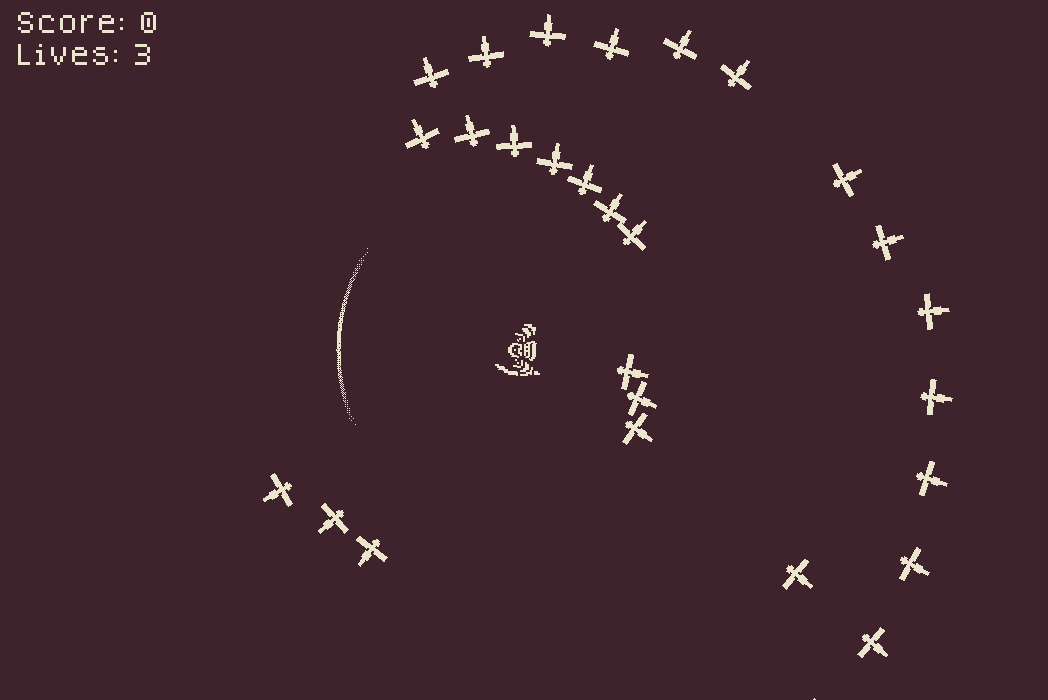
Continuous Cut is a small, relaxing slasher we built in Godot for a class jam. We started from two prompt words, “cut” and “spin,” and ended up with something like Fruit Ninja crossed with Vampire Survivors. Enemies come at you, you cut them down. We had a pretty limited amount of time, so it isn’t all that polished, but it’s playable and it’s fun.
You can play it on itch.io, and the code’s on GitHub.
The design problem
We wanted Continuous Cut to feel deliberate. Carving long clean cuts through multiple enemies, planning the slices ahead of time, getting a nice reward with a bunch of points.
Our first prototypes did the opposite. There was no restriction on slashing, so playtesters clicked on every enemy the second it spawned. It worked, technically, but it felt like swatting flies. There wasn’t good flow.
So instead of giving players more to do, we took an option away. We added a restriction on how the slash could move, so you couldn’t jab at whatever popped up. To clear enemies well you had to commit to long, sweeping cuts. That got most of the feeling we wanted back. The parameters for the constraints needed a lot of tuning and I’d still tune them further given more time.
We also wanted a timestop mechanic, where you could let enemies creep closer in exchange for a shot at a bigger combo. It was too much to program in the time we had, so we cut it. Knowing what to drop is part of the job.
The slash
The slashing mechanic was the interesting piece to build. I treated the coordinates in polar space relative to the center of the screen, which is where the character is. Then I limited how fast the radius can change over time. That’s what forces the long sweeping arcs instead of letting you jab straight at a spawn.
I also wrote the ordered dithering shader on the slash and the slash guide. I took the shader from Crowd Surfers and modified it to work here, and the result is a gradient that still only uses 2 colors. It’s my favorite thing in the game to look at. I thought about doing a full-screen blue noise dithering pass at some point but we ran out of time. I’ll revisit that idea.
Getting the enemies to move properly was more of a pain than it should have been, though a couple of tutorials sorted that out.
Making the art work
Standardizing and finding the right pixel size for our pixel art took a bit of work, but we figured it out. Deciding on a color palette was also tricky, and with the help of some online resources we managed fine.
We went with a two-bit color palette. Keeping the colors simple gives the game a distinct look, and it meant we didn’t have to put a ton of time into every sprite. Our friend Sai Hamid drew up the main character sprite pretty quickly while I drew the enemies. All the art came together fast.
Splitting the work
I had a good amount of prior experience with Godot from Crowd Surfers, so I was confident going in. My friend Jack had less experience and is more geared toward game design, so he took the UI and sound effects while I worked on the enemy and slashing behavior.
Credits and tools
- Main character sprite by Sai Hamid
- Color palette picked from Lospec
- Sound and music from Pixabay
- Enemy logic got a boost from this tutorial